
-
Solutions
Back
Cepheid’s Solutions
-
Global Access
-
Testing Everywhere
Back
Testing Everywhere
-
Antibiotic Stewardship
-
Customized Testing for Your Institution
-
Knowing MORE Matters
-
-
Insights
Back
Cepheid’s Insights
-
Webinars
Back
Webinars
-
Cepheid RADAR
Back
Cepheid RADAR
-
Support
Back
Support Center
-
Documents & Technical Resources
-
Troubleshooting and How-tos
-
MyCepheid and Order Support
-
Contact Us
Back
Contact Us
-
-
About Us
Back
About Cepheid
-
Mission and History
Back
Mission and History
-
Our Leadership
Back
Our Leadership
-
Events
Back
Events
-
Distributors
Back
Distributors
-
Business Development Opportunities
-
Innovate with Cepheid
-
Meet the Cepheid Bike
-
News
Back
News
-
Careers
Back
Careers
-


Critical Vulnerability Notification: TLS Version 1.0 and 1.1 Protocol Detection
Updated March 12. 2026
BACKGROUND
The GeneXpert Dx 6.4a supports TLS 1.0 and TLS 1.1, which are deprecated and considered insecure. These outdated protocol versions are susceptible to multiple cryptographic weaknesses and downgrade attacks, which could expose secure communications to interception or manipulation.
It is recommended to enable TLS 1.2 and TLS 1.3, and disable support for TLS 1.0 and TLS 1.1, following Microsoft’s guidance for secure protocol configuration.
For more information click here:
https://learn.microsoft.com/en-us/intune/configmgr/core/plan-design/security/enable-tls-1-2-client
CEPHEID PRODUCTS AFFECTED
Dx customers using Dx 6.4a software are impacted.
ACTIONS REQUIRED BY CUSTOMERS
Before applying the update, Cepheid strongly recommends working with your IT group or representative to ensure that the registry and test result data are backed up appropriately. For guidance on shutting down the software and backing up test result data, please refer to the Dx 6.4a Operator Manual. If you have any questions or concerns, please contact Cepheid Technical Support.
Once back-up of the registry and database or test data is complete, proceed with the following:
Steps to follow to apply this-
- Open Registry Editor
- Press Windows + S, type Registry Editor, and hit Enter.
- Press Windows + S, type Registry Editor, and hit Enter.
- Navigate to the following path:
Computer\HKEY_LOCAL_MACHINE\SYSTEM\CurrentControlSet\Control\SecurityProviders\SCHANNEL\Protocols
- Create TLS 1.0 and TLS 1.1 keys
- Right-click on Protocols → New > Key → name it TLS 1.0
- Repeat for TLS 1.1
- Create Client and Server subkeys under each TLS key:
- Right-click on TLS 1.0 → New > Key → name it Client
- Repeat for Server
- Do the same under TLS 1.1
- Disable TLS 1.0 and 1.1:
- Inside each Client and Server folder:
- Right-click in the right pane → New > DWORD (32-bit) Value
- Name it Enabled → set value to 0
- Create another DWORD named DisabledByDefault → set value to 1
- Inside each Client and Server folder:
- Close Registry Editor
- Restart SQL Server Service:
- Press Windows + R, type services.msc, and hit Enter
- Locate SQL Server (MSSQLSERVER)
- Right-click → Restart
- Verify TLS Registry Configuration via PowerShell:

- Verify SQL Server TLS Handshake Behavior:
Run the following PowerShell script to test TLS 1.0 and 1.1 connectivity to SQL Server:

Critical Vulnerability Notification: Windows 10 Version 21H2 / 22H2 Security Update (November 2025) KB5068781
Updated March 12. 2026
BACKGROUND
The installed version of Windows 10 (21H2 / 22H2) is missing the November 2025 Security Update (KB5068781) and is affected by multiple vulnerabilities. CVEs in scope include:
CVE 2025 59505, CVE 2025 59506, CVE 2025 59507, CVE 2025 59508, CVE 2025 59509, CVE 2025 59510, CVE 2025 59511, CVE 2025 59512, CVE 2025 59513, CVE 2025 59514, CVE 2025 59515, CVE 2025 60703, CVE 2025 60704, CVE 2025 60705, CVE 2025 60707, CVE 2025 60709, CVE 2025 60714, CVE 2025 60715, CVE 2025 60716, CVE 2025 60717, CVE 2025 60719, CVE 2025 60720, CVE 2025 60723, CVE 2025 60724, CVE 2025 62208, CVE 2025 62209, CVE 2025 62213, CVE 2025 62215, CVE 2025 62217, CVE 2025 62218, CVE 2025 62219, CVE 2025 62452.
These vulnerabilities span remote code execution, privilege escalation, information disclosure, kernel level issues, and other system level risks.
Microsoft has released KB5068781 as a cumulative security update to address all the above vulnerabilities.
For more information click here: https://support.microsoft.com/en-us/topic/november-11-2025-kb5068781-os-builds-19044-6575-and-19045-6575-7fe13257-9079-49af-9369-e0e6242701dd
CEPHEID PRODUCTS AFFECTED
Dx customers using Dx 6.4a software are impacted.
ACTIONS REQUIRED BY CUSTOMERS
Apply the Microsoft Security Update KB5068781 using the download link below:
Customers with auto update disabled must manually install this security update to remain protected.
Critical Vulnerability Notification: Microsoft .NET Core (June 2025) KB5061935
Updated March 11. 2026
BACKGROUND
The .Net Runtime component of the Xpertise 7.1 system is missing the Microsoft .NET 8.0.17 Security Update (KB5061935), released as part of Microsoft’s June 2025 servicing updates. This security update includes critical fixes for the .NET runtime and SDK, including remediation for the following vulnerability:
CVE‑2025‑30399 – .NET Remote Code Execution Vulnerability
This update delivers the patched .NET 8.0.17 runtime and corresponding SDK components required to protect systems against remote code execution scenarios.
The update is available through the Microsoft Update Catalog as part of the .NET 8.0.17 Security Update packages (KB5061935)
For more information click here: https://msrc.microsoft.com/update-guide/en-US/vulnerability/CVE-2025-30399
CEPHEID PRODUCTS AFFECTED
Infinity customers using GeneXpert Xpertise 7.1 software are impacted.
ACTIONS REQUIRED BY CUSTOMERS
Apply Microsoft Security Update KB5061935 and download from here: https://catalog.s.download.windowsupdate.com/c/msdownload/update/software/secu/2025/06/dotnet-sdk-8.0.411-win-x64_93d04ad9ad5c0f7c48c260381c89a82a644ab419.exe
Please ensure you have downloaded the latest Microsoft Windows Security Update which would allow your system to be fully protected from this vulnerability. Customers with automatic updates do not need to take further action.
If you have not yet automated Windows updates, select Start > Settings > Update & Security > Windows Update and then select ‘Check for updates’.
Critical Vulnerability Notification: Microsoft SQL Server September 2025 KB5065222, KB5068402 and KB5068404
Updated March 11. 2026
BACKGROUND
The Microsoft SQL Server component of the GeneXpert Dx 6.4a, GeneXpert Xpress 6.4a, and GeneXpert Xpertise 7.1 systems is missing required security updates released in September 2025 (KB5065222) and November 2025 (KB5068402 / KB5068404). Missing these security updates may allow unauthorized command execution, improper input handling, information disclosure, or privilege escalation.
CVEs in scope include CVE 2024 21907, CVE 2025 47997, CVE 2025 55229, CVE 2025 59499, and other related SQL Server engine vulnerabilities as described in Microsoft’s advisories.
Microsoft has released security patched SQL Server updates to fully address these issues.
CEPHEID PRODUCTS AFFECTED
- Dx customers using GeneXpert Dx 6.4a software are impacted.
- GeneXpert Xpress system customers using GeneXpert Xpress 6.4a software are impacted.
- Infinity customers using GeneXpert Xpertise 7.1 software are impacted.
ACTIONS REQUIRED BY CUSTOMERS
Important: Before applying the SQL Server update on any GeneXpert system, refer to the Operator Manual (Dx 6.4a, Xpress 6.4a, or Xpertise 7.1) for validated instructions on performing a database backup using the software interface. This ensures the backup is completed in accordance with validated procedures.
- Verify Current SQL Server Version (Dx 6.4a and Xpress 6.4a – SQL Server 2017)
- Navigate to: C:\Program Files\Microsoft SQL Server\MSSQL14.MSSQLSERVER\MSSQL\Binn\sqlservr.exe
- If the version is below 14.0.3515.1, proceed to the next step
- Verify Current SQL Server Version (Xpertise 7.1 – SQL Server 2019)
- Navigate to: C:\Program Files\Microsoft SQL Server\MSSQL15.MSSQLSERVER\MSSQL\Binn\sqlservr.exe
- If the version is below 15.0.4445.1, proceed to the next step
- Download and Apply Patch
- For Dx 6.4a / Xpress 6.4a (SQL Server 2017 – November 2025 KB5068402)
- Download the official Microsoft security update installer from: https://catalog.s.download.windowsupdate.com/c/msdownload/update/software/secu/2025/10/sqlserver2017-kb5068402-x64_624967451eeb2cc99334fb8c11aaee5878b7dc25.exe
- Double click the executable to install the update.
- After installation, confirm that the SQL Server version has been updated to 14.0.3515.1
- For Xpertise 7.1 (SQL Server 2019 – September 2025 KB5065222)
- Download the official Microsoft security update installer from: https://catalog.s.download.windowsupdate.com/d/msdownload/update/software/secu/2025/08/sqlserver2019-kb5065222-x64_6c79c7bda2b1dd4f6903c4534aa90a1d2ed8c84b.exe
- Double click the executable to install the update.
- After installation, confirm that the SQL Server version has been updated to 15.0.4445.1
- For Dx 6.4a / Xpress 6.4a (SQL Server 2017 – November 2025 KB5068402)
Critical Vulnerability Notification: Microsoft Edge (Chromium) < 141.0.3537.71 Multiple Vulnerabilities
Updated March 11. 2026
BACKGROUND
The Xpertise 7.1 system running a version of Microsoft Edge (Chromium) earlier than 141.0.3537.71, which is affected by multiple security vulnerabilities disclosed in Microsoft’s October 9, 2025, security bulletin.
These include:
- CVE‑2025‑11458 – Heap buffer overflow in Sync
Affects Microsoft Edge Chromium-based builds prior to 141.0.3537.71 and may allow memory corruption or remote exploitation when a user opens maliciously crafted web content. https://msrc.microsoft.com/update-guide/vulnerability/CVE-2025-11458
- CVE‑2025‑11460 – Use‑after‑free in Storage
It also affects Edge versions prior to 141.0.3537.71, potentially enabling memory corruption or arbitrary code execution under certain conditions. https://msrc.microsoft.com/update-guide/vulnerability/CVE-2025-11460
CEPHEID PRODUCTS AFFECTED
Infinity customers using GeneXpert Xpertise 7.1 software are impacted.
ACTIONS REQUIRED BY CUSTOMERS
Upgrade Microsoft Edge to version 141.0.3537.71 or later to ensure protection from these vulnerabilities.
You may update Microsoft Edge by:
- Downloading the latest Microsoft Edge Stable build from Microsoft, or
- Navigating to Settings > Help & Feedback > About Microsoft Edge to trigger the update, or
- Use your organization’s software deployment tools to push the latest Edge version.
Critical Vulnerability Notification: Apache OpenOffice (Version < 4.1.16)
Updated March 11. 2026
BACKGROUND
The Apache OpenOffice component of the Xpertise 7.1 system is installed at a version earlier than 4.1.16 and is affected by multiple security vulnerabilities. CVEs in scope include CVE 2025 64401, CVE 2025 64402, CVE‑2025‑64403, CVE‑2025‑64404, CVE‑2025‑64405, CVE‑2025‑64406, CVE‑2025‑64407, CVE-2025-47997, CVE-2025-55231.
These vulnerabilities could lead to remote code execution, memory corruption, or denial‑of‑service depending on the attack vector.
Apache has released updated security‑patched installers in version 4.1.16.
For more information click here: https://www.openoffice.org/security/cves/CVE-2025-64403.html
CEPHEID PRODUCTS AFFECTED
GeneXpert customers using Xpertise 7.1 software are impacted.
ACTIONS REQUIRED BY CUSTOMERS
Download and apply the latest Apache OpenOffice security patched release (4.1.16 or later) from the link above.
Customers with auto update disabled must manually install this security update to remain protected.
Critical Vulnerability Notification: Microsoft .NET Core (October 2025) KB5066136
Updated March 11. 2026
BACKGROUND
The .Net Runtime component of the Xpertise 7.1 system is missing the Microsoft .NET Core Security Update (October 2025), which was released as part of Microsoft’s October 2025 service updates. This security update includes critical fixes for the .NET runtime and SDK, including remediation for the following vulnerability:
- CVE 2025 55248 – .NET Remote Code Execution Vulnerability
This update delivers the patched .NET SDK 9.0.111 and corresponding runtime components required to protect systems against remote code execution scenarios.
The update is available through the Microsoft Update Catalog as part of the .NET Core October 2025 Security Update packages.
For more information click here: https://msrc.microsoft.com/update-guide/vulnerability/CVE-2025-55248
CEPHEID PRODUCTS AFFECTED
Infinity customers using GeneXpert Xpertise 7.1 software are impacted.
ACTIONS REQUIRED BY CUSTOMERS
Apply Microsoft Security Update KB5066136 and download from here: https://catalog.s.download.windowsupdate.com/c/msdownload/update/software/secu/2025/10/dotnet-sdk-9.0.111-win-x64_c47e76d1e781892049e7a833169f34ef7b236552.exe
Please ensure you have downloaded the latest Microsoft Windows Security Update which would allow your system to be fully protected from this vulnerability. Customers with automatic updates do not need to take further action.
If you have not yet automated Windows updates, select Start > Settings > Update & Security > Windows Update and then select ‘Check for updates.
Critical Vulnerability Notification: Visual Studio Tools for Applications (VSTA) Elevation of Privilege Vulnerability
Updated March 11. 2026
BACKGROUND
The Visual Studio Tools for Applications (VSTA) installed in Xpertise 7.1 is earlier than 16.0.35907.0 / 17.0.35906.0 and is affected by a security vulnerability. The CVE in scope is CVE‑2025‑29803, an uncontrolled search path element vulnerability that could allow an attacker with local access to escalate privileges by causing VSTA to load malicious files from an untrusted directory.
This vulnerability could lead to local privilege escalation, unauthorized code execution, or system compromise depending on the attack vector.
Microsoft has released updated, security‑patched VSTA builds in VSTA 16.0.35907.0 and VSTA 17.0.35906.0 to fully address this issue.
For more information click here: https://msrc.microsoft.com/update-guide/vulnerability/CVE-2025-29803
CEPHEID PRODUCTS AFFECTED
GeneXpert customers using Xpertise 7.1 software are impacted.
ACTIONS REQUIRED BY CUSTOMERS
Upgrade to VSTA 16.0.35907.0, 17.0.35906.0, or later.
Download the latest VSTA installer from the official Microsoft link below: https://download.microsoft.com/download/e7e20e87-14f9-4f72-ad3d-56239300cfad/vsta_2019_setup_ENU.exe
Customers must ensure VSTA is updated to fully eliminate the vulnerability risk.
Critical Vulnerability Notification: Windows Speculative Execution Configuration Check
Updated March 11. 2026
BACKGROUND
The Windows OS of the GeneXpert Xpress 6.4a has not implemented the recommended mitigations for speculative execution side channel vulnerabilities. CVEs in scope include:
CVE 2017 5715, CVE 2017 5753, CVE 2017 5754, CVE 2018 12126, CVE 2018 12127, CVE 2018 12130, CVE 2018 3615, CVE 2018 3620, CVE 2018 3639, CVE 2018 3646, CVE 2019 11135, CVE 2022 0001.
These vulnerabilities impact CPU speculative execution behavior and may allow unauthorized data access or privilege escalation if not mitigated. Microsoft recommends applying specific registry settings to enforce OS level mitigation controls.
CEPHEID PRODUCTS AFFECTED
GeneXpert Xpress system customers using Xpress 6.4a software are impacted.
ACTIONS REQUIRED BY CUSTOMERS
Apply Recommended Registry Settings
Before applying the update, Cepheid strongly recommends working with your IT group or representative to ensure that the registry and test result data are backed up appropriately. For guidance on shutting down the software and backing up test result data, please refer to the Dx 6.4a Operator Manual. If you have any questions or concerns, please contact Cepheid Technical Support.
Once back up of the registry and database or test data is complete, proceed with the following:
- Open Command Prompt or PowerShell with administrative privileges and run:
- reg add "HKEY_LOCAL_MACHINE\SYSTEM\CurrentControlSet\Control\Session Manager\Memory Management" /f /v FeatureSettingsOverrideMask /t REG_DWORD /d 3
- reg add "HKEY_LOCAL_MACHINE\SYSTEM\CurrentControlSet\Control\Session Manager\Memory Management" /f /v FeatureSettingsOverride /t REG_DWORD /d 8
Verify Configuration
- Run the following PowerShell commands:
- Get-ItemProperty "HKLM:\SYSTEM\CurrentControlSet\Control\Session Manager\Memory Management" -Name FeatureSettingsOverrideMask
- Get-ItemProperty "HKLM:\SYSTEM\CurrentControlSet\Control\Session Manager\Memory Management" -Name FeatureSettingsOverride
- Ensure values are set to 3 and 8, respectively.
Restart the System
- Reboot the machine to apply the mitigations.
Critical Vulnerability Notification: Adobe Reader < 20.005.30838 / 25.001.20997 Multiple Vulnerabilities (APSB25 119)
Updated March 11. 2026
BACKGROUND
The Adobe Reader component of GeneXpert Xpress 6.4a is earlier than 20.005.30838 or 25.001.20997 and is affected by multiple vulnerabilities. CVEs in scope include CVE 2025 64785, CVE 2025 64786, CVE 2025 64787, and CVE 2025 64899.
These vulnerabilities could result in arbitrary code execution, privilege escalation, memory corruption, or application crashes depending on the attack vector. Adobe has released updated security patched installers to address these vulnerabilities.
For more information refer to Adobe Security Bulletin APSB25 119: https://helpx.adobe.com/in/security/products/acrobat/apsb25-119.html
CEPHEID PRODUCTS AFFECTED
GeneXpert Xpress system customers using Xpress 6.4a software are impacted.
ACTIONS REQUIRED BY CUSTOMERS
Apply Recommended Registry Settings
Upgrade Adobe Reader to version 20.005.30838 / 25.001.20997 or later by downloading the security update below: https://ardownload3.adobe.com/pub/adobe/acrobat/win/AcrobatDC/2500120997/AcroRdrDCx64Upd2500120997.msp
Customers must ensure Adobe Reader is updated to fully eliminate these vulnerabilities.
Critical Vulnerability Notification: Windows 10 Security Update KB5053606, KB5055518, KB5058379.
Updated September 30, 2025
Note: The correct installation sequence is 1) KB5053606, 2) KB5055518, 3) KB5058379
BACKGROUND
The GeneXpert system connected to a touchscreen is affected by a critical Windows 10 kernel vulnerability addressed in Security Update KB5053606. This vulnerability could allow privilege escalation and remote code execution if left unpatched.
These are addressed through a sequence of cumulative updates:
- KB5053606 – Prerequisite update
- KB5055518 – Addresses kernel-level vulnerabilities
- KB5058379 – Final cumulative update
For more information, please reference the following: https://support.microsoft.com/en-us/topic/april-8-2025-kb5055518-os-builds-19044-5737-and-19045-5737-6329246b-63bb-4d0a-9e95-e22926fbbe51.
CEPHEID PRODUCTS AFFECTED
GeneXpert system customers using Cepheid OS 2.1 software on the touchscreen are impacted.
ACTIONS REQUIRED BY CUSTOMERS
- Verify Current Kernel Version
- Path: C:\Windows\system32\ntoskrnl.exe
- If the version is 10.0.19041.5369, proceed to the next step.
- Download and Apply Patch
- Step 1: Install KB5053606 (Download KB5053606)
- Step 2. Install KB5055518 (Download KB5055518)
- Step 3. Install KB5058379 (Download KB5058379)
- Double click each .msu file to install update.
- Reboot if prompted after each update
- Verify Update
- Confirm that the kernel version is updated to 10.0.19041.5848.
TLS 1.0/1.1 Protocol Support
Updated September 30, 2025
BACKGROUND
The remote service accepts connections encrypted using TLS 1.0 and TLS 1.1, which are outdated and insecure protocols. These protocols are potentially vulnerable to multiple cryptographic attacks and should be disabled in favor of TLS 1.2 or TLS 1.3.
For more information, please reference:
- Tenable Plugin ID 104743
- Tenable Plugin ID 112546
CEPHEID PRODUCTS AFFECTED
Infinity customers using Xpertise 7.1 software are impacted.
ACTIONS REQUIRED BY CUSTOMERS
Before applying the update, Cepheid strongly recommends working with your IT group or representative to ensure that the registry and test result data are backed up appropriately. For guidance on shutting down the software and backing up test result data, please refer to the Infinity Xpertise 7.1 Operator Manual. If you have any questions or concerns, please contact Cepheid Technical Support.
Once back up of the registry and database or test data is complete, proceed with the following:
Steps to follow to apply this-
- Open Registry Editor
- Press Windows + S, type Registry Editor, and hit Enter.
- Navigate to the following path:
- Computer\HKEY_LOCAL_MACHINE\SYSTEM\CurrentControlSet\Control\SecurityProviders\SCHANNEL\Protocols
- Create TLS 1.0 and TLS 1.1 keys:
- Right-click on Protocols → New > Key → name it TLS 1.0
- Repeat for TLS 1.1
- Create Client and Server subkeys under each TLS key:
- Right-click on TLS 1.0 → New > Key → name it Client
- Repeat for Server
- Do the same under TLS 1.1
- Disable TLS 1.0 and 1.1:
- Inside each Client and Server folder:
- Right-click in the right pane → New > DWORD (32-bit) Value
- Name it Enabled → set value to 0
- Create another DWORD named DisabledByDefault → set value to 1
- Inside each Client and Server folder:
- Close Registry Editor
- Restart SQL Server Service:
- Press Windows + R, type services.msc, and hit Enter
- Locate SQL Server (MSSQLSERVER)
- Right-click → Restart
9. Verify TLS Registry Configuration via PowerShell:

10. Verify SQL Server TLS Handshake Behavior:
Run the following PowerShell script to test TLS 1.0 and 1.1 connectivity to SQL Server:

Critical Vulnerability Notification: Microsoft SQL Server 2019 Security Update KB5046860
Updated September 30, 2025
BACKGROUND
The Microsoft SQL Server 2019 installation is missing security update KB5046860, exposing it to remote code execution vulnerabilities. Please reference the following: https://support.microsoft.com/en-us/topic/kb5046860-description-of-the-security-update-for-sql-server-2019-cu29-november-12-2024-4bddde28-482c-4628-a6e2-2d4f542088b7 .
CEPHEID PRODUCTS AFFECTED
Infinity customers using Xpertise 7.1 software are impacted.
ACTIONS REQUIRED BY CUSTOMERS
The required version is 15.0.4410.1
Important: Before applying the SQL Server update, refer to the Xpertise 7.1 Operator Manual for instructions on performing a database backup using the software interface. This ensures the backup is completed in accordance with validated procedures.
- Verify Current SQL Server Version
- Navigate to: C:\Program Files\Microsoft SQL Server\MSSQL15.MSSQLSERVER\MSSQL\Binn\sqlservr.exe
- If the version is 15.0.4326.1, proceed to the next step.
- Download and Apply Patch
- Double-click the executable to install: https://catalog.s.download.windowsupdate.com/d/msdownload/update/software/secu/2024/11/sqlserver2019-kb5046860-x64_618ad2ed38cad99be8fc5688ab98a10813e98de1.exe
Download KB5046860
- Double-click the executable to install: https://catalog.s.download.windowsupdate.com/d/msdownload/update/software/secu/2024/11/sqlserver2019-kb5046860-x64_618ad2ed38cad99be8fc5688ab98a10813e98de1.exe
- Verify Update
- Confirm that the SQL Server version is updated to 15.0.4410.1
Critical Vulnerability Notification: Dell BIOS Security Patch
Updated September 30, 2025
BACKGROUND
The Dell BIOS on the remote device is missing a security patch and is affected by an improper NULL termination vulnerability that can result in a denial of service (DoS).
Installed version is 1.17.0. For more information, please reference the following: https://www.dell.com/support/home/en-us/drivers/driversdetails?driverid=4jpn9&oscode=wt64a&productcode=optiplex-xe4.
CEPHEID PRODUCTS AFFECTED
Infinity customers using Xpertise 7.1 software are impacted.
ACTIONS REQUIRED BY CUSTOMERS
The fixed version is 1.19.0 for OptiPlex XE4 series.
- Download and Apply BIOS Patch
- Visit the Dell support page and search for OptiPlex XE4 Tower: https://www.dell.com/support/kbdoc/en-us/000220410/dsa-2023-467-security-update-for-a-dell-platform-bios-vulnerability
- Verify Update
- Confirm that the BIOS version is updated to 1.19.0
Windows 10 Pro End of Support Reminder & Windows 11 Qualification for Select GeneXpert Dx Systems
Updated July 17, 2025
As part of Cepheid’s commitment to consistent Microsoft operating system (OS) security patch management, we are reminding you that Microsoft plans to end support for Windows 10 Pro OS on October 14, 2025. After this date, Microsoft will no longer provide critical security patches or updates for Windows 10 Pro OS. To maintain the highest standards of security and performance, we strongly recommend an operating system upgrade on your GeneXpert system.
Cepheid has now qualified an upgrade to Windows 11 Pro OS for select previously shipped GeneXpert Dx systems already running Windows 10 Pro OS (and not running Windows 10 IoT Enterprise LTSC). To be eligible for this upgrade, GeneXpert systems must run GeneXpert Dx software version 6.4 or higher and meet specific computer hardware and operating system requirements
A multi-language flyer (Part Number 303-5234) containing a list of requirements and further information about the Windows 11 Pro OS upgrade option is available. If you have any questions or concerns, please contact Cepheid Technical Support.
CEPHEID PRODUCTS AFFECTED
The following GeneXpert systems are affected:
• GeneXpert Infinity computers running Windows 10 Pro OS
• GeneXpert-II running Windows 10 Pro OS
• GeneXpert-IV running Windows 10 Pro OS
• GeneXpert-XVI running Windows 10 Pro OS
The following GeneXpert systems are not in the scope:
• GeneXpert Infinity and Dx systems running Windows 10 IoT Enterprise LTSC do not require a change as they are still fully supported by Microsoft through ongoing security updates.
• GeneXpert Dx systems connected to a touchscreen do not require a change.
• GeneXpert Xpress Hub systems employed in CLIA-waived environments will continue to receive Windows OS updates until January 9, 2029.
Critical Vulnerability Notification: CVE-2024-38255, CVE-2024-43459, CVE-2024-43462, CVE-2024-48993 through CVE-2024-49018
Updated July 17, 2025
BACKGROUND
The GeneXpert Dx system running Dx 6.5 software is affected by multiple critical vulnerabilities in Microsoft SQL Server 2019 (version 15.0.4223.1), which may allow remote code execution and unauthorized command execution.
For more information, please reference the following: https://support.microsoft.com/enus/topic/kb5046860-description-of-the-security-update-for-sql-server-2019-cu29november-12-2024-4bddde28-482c-4628-a6e2-2d4f542088b7.
CEPHEID PRODUCTS AFFECTED
Dx customers using GeneXpert Dx 6.5 software are impacted.
ACTIONS REQUIRED BY CUSTOMERS
1. Verify Current SQL Server Version
Navigate to the following path and check the version:
C:\Program Files\Microsoft SQL
Server\MSSQL15.MSSQLSERVER\MSSQL\Binn\sqlservr.exe If the version is 15.0.4223.1, proceed to the next step.
2. Download and Apply Patch
Double-click on the link below to for the executable to install:
https://catalog.s.download.windowsupdate.com/d/msdownload/update/software/s ecu/2024/11/sqlserver2019-kb5046860-
x64_618ad2ed38cad99be8fc5688ab98a10813e98de1.exe
3. Verify Update
After installation, confirm that the SQL Server version is updated to 15.0.4410.1.
Adobe Reader Update & Critical Vulnerability Notification: CVE-2024-49530 through CVE-2024-49535 & CVE-2025-24431, CVE-2025-27158 through CVE-2025-27164, CVE2025-27174
Updated July 17, 2025
BACKGROUND
Multiple vulnerabilities have been identified in Adobe Acrobat Reader versions prior to 25.001.20432, which may allow arbitrary code execution. These are documented under APSB25-14.
CEPHEID PRODUCTS AFFECTED
Dx customers using GeneXpert Dx 6.5 software are impacted.
GeneXpert Xpress customers using GeneXpert Xpress 6.4a software are impacted.
ACTIONS REQUIRED BY CUSTOMERS
1. Verify Installed Version
Path: C:\Program Files (x86)\Adobe\Acrobat Reader DC\Reader If the version is below 25.001.20432, proceed to the next step.
2. Download and Install Update
Visit Adobe Acrobat Reader Download Page
- Click on “More download options” and install version 25.001.20432 (preferred)
- If this version is not available, upgrade to version 24.005.20320
3. Verify Update
Confirm that the version is updated to 25.001.20432 or 24.005.20320
Critical Vulnerability Notification: Windows 10 Security Update KB5049981
Updated July 17, 2025
BACKGROUND
The remote Windows 10 host is missing security update KB5049981, exposing it to potential vulnerabilities including privilege escalation and remote code execution.
For more information, please reference the following: https://support.microsoft.com/enus/topic/january-14-2025-kb5049981-os-builds-19044-5371-and-19045-5371-12f3788f6e7d-4524-8ab3-27d1666e0510
The following CVEs are in scope: CVE-2024-7344, CVE-2025-21189, CVE-2025-21202,
CVE-2025-21207, CVE-2025-21210-21211, CVE-2025-21213-21215, CVE-2025-21217,
CVE-2025-21219-21220, CVE-2025-21223-21224, CVE-2025-21226-21246, CVE-202521248-21252, CVE-2025-21255-21258, CVE-2025-21260-21261, CVE-2025-21263, CVE2025-21265-21266, CVE-2025-21268-21278, CVE-2025-21280-21282, CVE-2025-21284-
21296, CVE-2025-21298-21308, CVE-2025-21310, CVE-2025-21312, CVE-2025-21314,
CVE-2025-21316-21321, CVE-2025-21323-21324, CVE-2025-21327-21336, CVE-202521338-21341, CVE-2025-21374, CVE-2025-21378, CVE-2025-21382, CVE-2025-21389,
CVE-2025-21409, CVE-2025-21411, CVE-2025-21413, CVE-2025-21417
CEPHEID PRODUCTS AFFECTED
Dx customers using GeneXpert Dx 6.5 software running Windows 10 version 21H2 or 22H2 are impacted.
ACTIONS REQUIRED BY CUSTOMERS
1. Download and Apply Path
Double-click the .msu file to install:
https://catalog.s.download.windowsupdate.com/d/msdownload/update/software/s ecu/2025/01/windows10.0-kb5049981-
x64_bda073f7d8e14e65c2632b47278924b8a0f6b374.msu
2. Verify Update
Confirm that the system has been updated via Windows Update history or system info.
Critical Vulnerability Notification: CVE-2025-21176
Updated July 17, 2025
BACKGROUND
The Microsoft .NET Framework 4.8.1 installation on the remote host is missing a security update exposing it to remote code execution. This vulnerability may allow attackers to execute unauthorized code via a specially crafted request.
For more information, please reference the following: https://support.microsoft.com/enus/topic/january-14-2025-kb5049621-cumulative-update-for-net-framework-3-5-and-4-81-for-windows-10-version-21h2-and-windows-10-version-22h2-3c3adbc9-113c-410897d2-cdbedfee776f.
CEPHEID PRODUCTS AFFECTED
Dx 6.5 systems running Microsoft .NET Framework 4.8.1 are impacted.
ACTIONS REQUIRED BY CUSTOMERS
1. Verify Current Version Navigate to:
C:\Windows\Microsoft.NET\Framework\v4.0.30319\mscorlib.dll
- If the version is 4.8.9256.0, proceed to the next step.
2. Download and Apply Patch
Double-click on the .msu file to install:
https://catalog.s.download.windowsupdate.com/d/msdownload/update/software/s ecu/2024/12/windows10.0-kb5049621-x64-
ndp481_8cf3ab9195ec940d2da51894fb690b2d21404e8e.msu
3. Verify Update
Confirm that the version is updated to 4.8.9290.0.
TLS 1.0/1.1 Protocol Support
Updated July 17, 2025
BACKGROUND
The remote service accepts connections encrypted using TLS 1.0 and TLS 1.1, which are outdated and insecure protocols. These protocols are potentially vulnerable to multiple cryptographic attacks and should be disabled in favor of TLS 1.2 or TLS 1.3.
For more information, please reference the following:
• https://www.tenable.com/plugins/nessus/104743
• https://www.tenable.com/plugins/was/112546
CEPHEID PRODUCTS AFFECTED
GeneXpert Xpress customers using GeneXpert Xpress 6.4a software are impacted.
ACTIONS REQUIRED BY CUSTOMERS
Before updating the Windows registry file, Cepheid strongly recommends that you work with your IT group or representative to ensure the update is performed in a manner that does not affect the functioning of the system. If you have any questions or concerns, please contact Cepheid Technical Support.
Cepheid highly recommends backing up the registry and test result data or the database. For instructions on how to shut down the software and back up test result data, please consult the user manual.
Once back up of the registry and database or test data is complete, proceed with the following:
Steps to follow to apply this.
1. Search for "Registry Editor" in windows search bar.
2. Navigate to below path.
Computer\HKEY_LOCAL_MACHINE\SYSTEM\CurrentControlSet\Control\SecurityProviders \SCHANNEL\Protocols
3. Under Protocols create two keys (folders) structure for TLS 1.0 and TLS 1.1 Note: Right click on the Protocols to create a new key.
4. Under each TLS folders create two more keys (folders) as Client and Server
5. Click on the client folder, on the RHS empty space right click and select NEW-DWORD option.
6. Rename to "Enabled" and should have the value set to "0"
Note: Same values to be created for TLS 1.0 and TLS 1.1 and both client and server folders.
7. Close the editor.
8. Open SQL Server configuration manager.
9. Click on SQL Server Services option.
10. Stop and start the SQL Server (MSSQLSERVER) service.
11. Close the SQL server configuration manager application.
12. Download Nmap tool from Google and install it in the system.
13. Open command prompt and enter the below command.
nmap -script ssl-enum-ciphers -p 1433 localhost
14. Hit the Enter button on the keyboard.
15. Verify that only TLS 1.2 and above is displayed in the cmd prompt.
Critical Vulnerability Notification: Microsoft SQL Server 2017
Updated July 17, 2025
BACKGROUND
The Microsoft SQL Server 2017 installation on the remote host is missing security update KB5046858, exposing it to potential remote code execution vulnerabilities.
For more information, please reference the following: https://support.microsoft.com/enus/topic/kb5046858-description-of-the-security-update-for-sql-server-2017-cu31november-12-2024-2984d3a5-0683-4f9b-9e6a-3888e67bd859.
The following CVEs are in scope: CVE-2024-38255, CVE-2024-43459, CVE-2024-43462, CVE-2024-48993 through CVE-2024-49043
CEPHEID PRODUCTS AFFECTED
GeneXpert Xpress customers using GeneXpert Xpress 6.4a software are impacted.
ACTIONS REQUIRED BY CUSTOMERS
1. Verify Current SQL Server Version Path:
C:\Program Files\Microsoft SQL
Server\MSSQL14.MSSQLSERVER\MSSQL\Binn\sqlservr.exe
- If the version is 14.0.3294.2, proceed to the next step.
2. Download and Apply Patch
Double-click on the executable file link here:
https://catalog.s.download.windowsupdate.com/c/msdownload/update/software/s ecu/2024/11/sqlserver2017-kb5046858-
x64_b681ef619a79265439b4109c01a02f54cfe89928.exe
3. Verify Update
Confirm that the version is updated to 14.0.3485.1.
Critical Vulnerability Notification: Windows 10 Security Update KB5051974, KB505518, KB5060633
Updated July 17, 2025
BACKGROUND
The remote Windows 10 host is missing security update KB5051974, which addresses multiple vulnerabilities including remote code execution and privilege escalation.
The following CVEs are in scope: CVE-2025-21181, CVE-2025-21184, CVE-2025-21190,
CVE-2025-21200, CVE-2025-21201, CVE-2025-21212, CVE-2025-21216, CVE-2025-21254,
CVE-2025-21337, CVE-2025-21347, CVE-2025-21349 through CVE-2025-21420
CEPHEID PRODUCTS AFFECTED
Dx customers using GeneXpert Dx 6.5 software are impacted.
ACTIONS REQUIRED BY CUSTOMERS
1. Download and Apply Patch
Double-click the .msu file to install:
https://catalog.s.download.windowsupdate.com/c/msdownload/update/software/s ecu/2025/02/windows10.0-kb5051974-
x64_74aa601c3966a9e1ad4efe6287550c0f0bdea59d.msu
2. Verify Update for KB5051974
Confirm installation via Windows Update history or system info.
3. Additional Updates for KB5055518 & KB5060533
Please proceed with the latest Microsoft Windows Security Update which would allow your system to be fully protected from this vulnerability. Customers with automatic updates do not need to take further action. If you have not yet automated Windows updates, select Start > Settings > Update & Security > Windows Update and then select ‘Check for updates’.
Critical Vulnerability Notification: Windows 10 Security Update KB5060533
Updated July 17, 2025
BACKGROUND
The remote Windows 10 host is missing security update KB5060533. This update addresses vulnerabilities in the Windows kernel that could allow privilege escalation and denial of service.
The following CVEs are in scope: CVE-2024-9157, CVE-2025-21180, CVE-2025-21247,
CVE-2025-24035, CVE-2025-24044, CVE-2025-24046, CVE-2025-24048, CVE-2025-24050–
24051, CVE-2025-24054–24056, CVE-2025-24059, CVE-2025-24061, CVE-2025-24066– 24067, CVE-2025-24071–24072, CVE-2025-24984–24985, CVE-2025-24987–24988, CVE-
2025-24991–24993, CVE-2025-24995–24997, CVE-2025-26633, CVE-2025-26645
CEPHEID PRODUCTS AFFECTED
Dx customers using GeneXpert Dx 6.5 software are impacted.
ACTIONS REQUIRED BY CUSTOMERS
1. Verify Current Kernel Version
Path: C:\Windows\system32\ntoskrnl.exe
- If the version is 10.0.19041.4894, proceed to the next step.
2. Download and Apply Patch Download KB5060533 -
https://www.catalog.update.microsoft.com/Search.aspx?q=KB5060533%20windo ws%2010%20x64
3. Verify Update
After applying the patch, confirm that the kernel version is updated to 10.0.19041.5965.
Note: This is a cumulative update. Applying KB5060533 alone is sufficient and includes all prior kernel-level security fixes.
Critical Vulnerability Notification: Windows 10 Security Update KB5060533
Updated July 17, 2025
BACKGROUND
The remote Windows 10 host is missing security update KB5060533, which addresses critical vulnerabilities in the Windows kernel and system components.
For more information, please reference the following: https://support.microsoft.com/enus/topic/june-10-2025-kb5060533-os-builds-19044-5965-and-19045-5965-eeae388cca1c-4569-95d7-3d7be2e0b8ba
The following CVEs are in scope: CVE-2025-21191, CVE-2025-21197, CVE-2025-21204,
CVE-2025-21205, CVE-2025-21221, CVE-2025-21222, CVE-2025-24058, CVE-2025-24060, CVE-2025-24062, CVE-2025-24073, CVE-2025-24074, CVE-2025-26635, CVE-2025-26637,
CVE-2025-26639, CVE-2025-26640, CVE-2025-26641, CVE-2025-26644, CVE-2025-26648,
CVE-2025-26663, CVE-2025-26665, CVE-2025-26666, CVE-2025-26668, CVE-2025-26669,
CVE-2025-26670, CVE-2025-26672, CVE-2025-26673, CVE-2025-26674, CVE-2025-26675,
CVE-2025-26678, CVE-2025-26679, CVE-2025-26681, CVE-2025-26686, CVE-2025-26687,
CVE-2025-26688, CVE-2025-27467, CVE-2025-27469, CVE-2025-27471, CVE-2025-27473,
CVE-2025-27476, CVE-2025-27477, CVE-2025-27478, CVE-2025-27481, CVE-2025-27484,
CVE-2025-27487, CVE-2025-27490, CVE-2025-27491, CVE-2025-27727, CVE-2025-27729,
CVE-2025-27730, CVE-2025-27731, CVE-2025-27732, CVE-2025-27735, CVE-2025-27736,
CVE-2025-27737, CVE-2025-27738, CVE-2025-27739, CVE-2025-27742, CVE-2025-29809, CVE-2025-29810, CVE-2025-29824.
CEPHEID PRODUCTS AFFECTED
Dx customers using GeneXpert Dx 6.5 software are impacted.
ACTIONS REQUIRED BY CUSTOMERS
1. Verify Current Kernel Version
Path: C:\Windows\system32\ntoskrnl.exe
- If the version is 10.0.19041.5369, proceed to the next step.
2. Download and Apply Patch
Download KB5060533 for 2025-04 Cumulative Update for Windows 10 Version 22H2 for x64-based Systems (the first row listed here):
https://www.catalog.update.microsoft.com/Search.aspx?q=KB5060533%20windo ws%2010%20x64
3. Verify Update
Confirm that the kernel version is updated to 10.0.19041.5965.
Critical Vulnerability Microsoft .NET Core SDK Notifications: CVE-38229, CVE-2024-43483, CVE-2024-4384, CVE-2024-43485
Updated April 21, 2025
BACKGROUND
The Infinity system running Xpertise 6.8 software on the GeneXpert computer utilizes Microsoft .NET Core SDK versions prior to 6.0.35, which contain multiple critical security vulnerabilities as identified in the vendor advisory, including CVE-38229, CVE-2024-43483, CVE-2024-4384, and CVE-2024-43485. For more information, please reference the following:
CEPHEID PRODUCTS AFFECTED
Infinity customers using GeneXpert Xpertise 6.8 software are impacted.
ACTIONS REQUIRED BY CUSTOMERS
If you are on .NET 6.0 or any version prior to 8.0.11, it's highly recommended that you upgrade to .NET 8.0.11, as .NET 6.0 will no longer receive security patches for this vulnerability from Microsoft.
To check and fix the version, please refer the following steps:
1. Identify Affected Versions: Check if your application is using any of the affected versions of .NET Core SDK. You can list the versions you have installed by running the dotnet --info command and will see the output like the following:
2. If you have version prior to 8.0.11, please continue with the following steps
3. To fix the issue please install the latest version of .NET 8.0.11 from below given link: https://download.visualstudio.microsoft.com/download/pr/27bcdd70-ce64-4049-ba24-2b14f9267729/d4a435e55182ce5424a7204c2cf2b3ea/windowsdesktop-runtime-8.0.11-win-x64.exe
4. To verify the download file hasn't been corrupted, please use the SHA512 checksum information above to validate the file as explained in Verify downloaded binaries
5. Verify the versions you have installed by running the dotnet --version command and will see the output like the following:
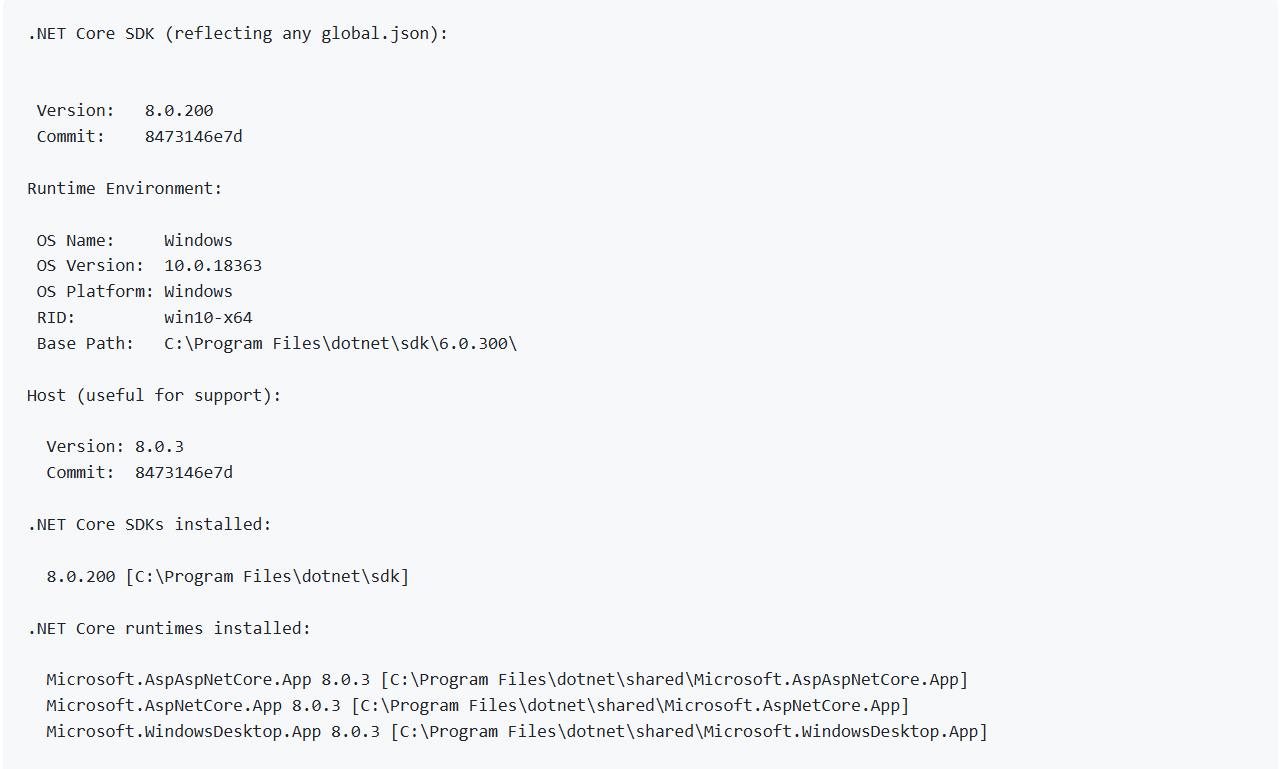
6. Check that the output will say: C:\Users/VirtualLab-Dev Team>Dotnet –version 8.0.11 to remediate this vulnerability
For more detailed information on steps related to this update, please contact Cepheid Technical Support at techsupport@cepheid.com.
Critical Vulnerability Notification: CVE-2023-48674
Updated April 21, 2025
BACKGROUND
The Dell BIOS on the Infinity system is missing a security patch and is, therefore, affected by an improper NULL termination vulnerability that can result in a denial of service (DoS) condition. A high-privilege user with network access to the computer can send malicious data.
CEPHEID PRODUCTS AFFECTED
Infinity customers using GeneXpert Xpertise 6.8 software are impacted.
ACTIONS REQUIRED BY CUSTOMERS
Please ensure that the ‘Fixed version’ for OptiPlex XE4 series is 1.22.0 for OptiPlex XE4 series whereas the installed version is currently 1.9.0. To check and fix the version for Dell OptiPlex XE4, please refer to the following steps:
1. Verify Current BIOS Version:
a. Check the current BIOS version installed on your OptiPlex XE4 system. If it's 1.9.0. Please follow step 2.
2. Download the Fixed BIOS Version:
a. Visit the Dell Support site and download the BIOS version 1.22.0 for the OptiPlex XE4 series.
3. Prepare for BIOS Update:
a. Backup all important data to prevent data loss during the update process.
b. Ensure your system is connected to a reliable power source.
4. Update the BIOS:
a. Follow the instructions provided by Dell to update the BIOS. This typically involves running the downloaded executable file and following the on-screen prompts.
5. Verify the Update:
a. After the update, restart your system and enter the BIOS setup to confirm that the BIOS version is now 1.22.0.
6. Monitor System Performance:
a. Cepheid recommends that post-update you monitor the computer for unusual behavior and report anything unusual to Cepheid Technical Support.
For more detailed information on steps related to this update, please contact Cepheid Technical Support at techsupport@cepheid.com.
Critical Vulnerability Associated with Windows Permissions
Updated April 21, 2025
BACKGROUND
Windows service executable with insecure permissions on the remote host may allow an unprivileged user to potentially overwrite with arbitrary code resulting in privilege escalation. For more information, please reference the following: https://www.tenable.com/plugins/nessus/65057.
CEPHEID PRODUCTS AFFECTED
Dx customers using Cepheid OS 2.1 software on the touchscreen are impacted.
ACTIONS REQUIRED BY CUSTOMERS
Cepheid recommends that this update be implemented by your organization’s IT department.
Please ensure that the following groups do not have permissions to modify or write service executable files that contain service executables:
- Everyone
- Users
- Domain Users
- Authenticated Users
For more detailed information on steps related to this update, please contact Cepheid Technical Support at techsupport@cepheid.com.
Critical Vulnerability Notification: CVE-2024-48993 through CVE-2024-49018, CVE-2024-49021, CVE-2024-49043.
Updated April 21, 2025
BACKGROUND
The Microsoft SQL Server installation on the remote host is missing security updates. It is, therefore, affected by multiple vulnerabilities. A third-party could potentially exploit this vulnerability and bypass authentication and execute unauthorized arbitrary commands. For more information, please reference the following: https://www.tenable.com/plugins/nessus/211471.
CEPHEID PRODUCTS AFFECTED
Dx customers using Cepheid OS 2.1 software on the touchscreen are impacted.
ACTIONS REQUIRED BY CUSTOMERS
The correct version should be 2019.150.4410.1 for SQL Server Version: 15.0.4223.1 Express Edition and SQL Server Instance: MSSQLSERVER.
Please download the link below and proceed to apply the patch: https://catalog.s.download.windowsupdate.com/d/msdownload/update/software/secu/2024/11/sqlserver2019-kb5046860-x64_618ad2ed38cad99be8fc5688ab98a10813e98de1.exe.
For more detailed information on steps related to this update, please contact Cepheid Technical Support at techsupport@cepheid.com.
Critical Vulnerability Notification: CVE-2025-21210, CVE-2025-21211, CVE-2025-21213, CVE-2025-21214, CVE-2025-21215, CVE-2025-21228 through CVE-2025-21241, CVE-2025-21244, CVE-2025-21245, CVE-2025-21246, CVE-2025-21300, CVE-2025-21301, CVE-2025-21302, CVE-2025-21304 through CVE-2025-21308
Updated April 21, 2025
BACKGROUND
The remote Windows host is missing security update 5049981. It is, therefore, affected by multiple vulnerabilities including but not limited to:
- Windows Reliable Multicast Transport Driver (RMCAST) Remote Code Execution Vulnerability
- Windows Telephony Service Remote Code Execution Vulnerability
- Windows BitLocker Information Disclosure Vulnerability
For more information, please reference the following: https://support.microsoft.com/en-us/topic/january-14-2025-kb5049981-os-builds-19044-5371-and-19045-5371-12f3788f-6e7d-4524-8ab3-27d1666e0510.
CEPHEID PRODUCTS AFFECTED
Dx customers using Cepheid OS 2.1 software on the touchscreen are impacted.
ACTIONS REQUIRED BY CUSTOMERS
The C:\Windows\system32\ntoskrnl.exe has not been patched and the correct version should be: 10.0.19041.5369
Please download the link below and proceed to apply the patch https://catalog.s.download.windowsupdate.com/d/msdownload/update/software/secu/2025/01/windows10.0-kb5049981-x64_bda073f7d8e14e65c2632b47278924b8a0f6b374.msu.
For more detailed information on steps related to this update, please contact Cepheid Technical Support at techsupport@cepheid.com.
Critical Vulnerability Notification: CVE-2025-21176
Updated April 21, 2025
BACKGROUND
CVE-2025-21176 is a security vulnerability in Microsoft's .NET Framework and Visual Studio allowing a third-party to execute code remotely. For more information, please reference the following: https://support.microsoft.com/en-us/topic/january-14-2025-kb5049613-cumulative-update-for-net-framework-3-5-and-4-8-for-windows-10-version-21h2-and-windows-10-version-22h2-5a937c4b-5764-4f98-84a9-7f81e232666e.
CEPHEID PRODUCTS AFFECTED
Dx customers using Cepheid OS 2.1 software on the touchscreen are impacted.
ACTIONS REQUIRED BY CUSTOMERS
The remote version should be 4.8.4772.0.
Please download the link below and proceed to apply the patch: https://catalog.s.download.windowsupdate.com/d/msdownload/update/software/secu/2024/12/windows10.0-kb5049613-x64-ndp48_9fb624c593353450a31118a4029ebed77699760b.msu/.
For more detailed information on steps related to this update, please contact Cepheid Technical Support at techsupport@cepheid.com.
GeneXpert Dx 6.5 Software Upgrade Announcement for Windows OS
Updated January 1, 2025
We would like to inform you of an important update regarding the compatibility and support for Cepheid’s GeneXpert Dx 6.5 software version used with GeneXpert Dx systems.
Effective immediately, the GeneXpert Dx 6.5 software version can no longer be installed on computers running the Windows 7 operating system. This decision follows the end of support for the Windows 7 operating system by Microsoft. As a result of the end of support for Windows 7, Cepheid is unable to ensure the security and functionality of GeneXpert Dx 6.5 software on this operating system. Continuing to use GeneXpert Dx 6.5 on Windows 7 could expose data on that computer and any connected device(s) to cybersecurity vulnerabilities.
Cepheid advises GeneXpert Dx systems with Windows 7 to upgrade to a supported operating system (Windows 10 IoT Enterprise LTSC), on a Cepheid configured computer which will continue to receive regular updates and security patches until January 13, 2032. This will ensure the continued security and optimal performance of your GeneXpert Dx systems on the latest software version GeneXpert Dx 6.5.
As a next step, we recommend you identify all systems currently running Windows 7 that use the GeneXpert Dx 6.5 software version and plan to upgrade these systems to a an actively supported operating system. Please defer to your organization or institution’s guidelines on whether re-validation is required once a new operating system is installed as a part of the upgrade.
If you have any questions or require assistance with the upgrade process, please do not hesitate contact Cepheid Technical Support at techsupport@cepheid.com.
Microsoft Windows OS Security Update
Updated January 1, 2025
BACKGROUND
Microsoft has released an update to address security issues for the Windows operating system. For more information, the Microsoft KB5043064 article can be found here: https://support.microsoft.com/en-us/topic/september-10-2024-kb5043064-os-builds-19044-4894-and-19045-4894-cd14b547-a3f0-4b8f-b037-4ae3ce83a781.
The following CVEs are in scope: CVE-2024-21416, CVE-2024-30073, CVE-2024-38014, CVE-2024-38045, CVE-2024-38046, CVE-2024-38119, CVE-2024-38217, CVE-2024-38234, CVE-2024-38235, CVE-2024-38237, CVE-2024-38238, CVE-2024-38239, CVE-2024-38240, CVE-2024-38241, CVE-2024-38242, CVE-2024-38243, CVE-2024-38244, CVE-2024-38245, CVE-2024-38246, CVE-2024-38247, CVE-2024-38248, CVE-2024-38249, CVE-2024-38250, CVE-2024-38252, CVE-2024-38254, CVE-2024-38256, CVE-2024-38257, CVE-2024-43461, CVE-2024-43487
CEPHEID PRODUCTS AFFECTED
Dx customers using GeneXpert Dx 6.5 software are impacted.
ACTIONS REQUIRED BY CUSTOMERS
Please download the following link from the Microsoft website: https://catalog.s.download.windowsupdate.com/c/msdownload/update/software/secu/2024/09/windows10.0-kb5043064-x64_0424c72dcc5ac6d6682f2108afe872ecb8a09394.msu
If you have any questions or concerns, please contact Cepheid Technical Support.
Critical Vulnerability Notifications: CVE-2024-21814 & CVE-2023-28388
Updated January 1, 2025
BACKGROUND
The Chipset Device Software installed on the Cepheid OS touchscreen may contain a vulnerability related to an uncontrolled search path element, potentially allowing an authenticated local attacker to escalate their privileges.
For more information, please reference the following:
- https://www.intel.com/content/www/us/en/security-center/advisory/intel-sa-00870.html
- https://www.tenable.com/plugins/nessus/186475
CEPHEID PRODUCTS AFFECTED
Dx customers using Cepheid OS 2.1 software on the touchscreen are impacted.
ACTIONS REQUIRED BY CUSTOMERS
Please upgrade to 10.1.19444.8378 software version or higher. The latest version of the utility version can be found here (version 10.1.19867.8574): https://www.intel.com/content/www/us/en/download/19347/chipset-inf-utility.html
If you have any questions or concerns, please contact Cepheid Technical Support techsupport@cepheid.com.
Critical Vulnerability Notification: CVE-2024-37334
Updated January 1, 2025
BACKGROUND
SQL Server OLE DB driver installed on the remote host lacks a security update and is impacted by a remote code execution vulnerability, leading an authenticated user to potentially connect to a malicious SQL server database via a connection driver. For more information, please reference the following: https://cve.mitre.org/cgi-bin/cvename.cgi?name=CVE-2024-37334
CEPHEID PRODUCTS AFFECTED
Dx customers using GeneXpert Dx 6.5 software are impacted.
Dx customers using Cepheid OS 2.1 software on the touchscreen are impacted.
ACTIONS REQUIRED BY CUSTOMERS
The link to the patch can be found below. Click the link and then click ‘Download’ to proceed.
https://www.catalog.update.microsoft.com/Search.aspx?q=KB5040711
If you have any questions or concerns, please contact Cepheid Technical Support at techsupport@cepheid.com.
Critical Vulnerability Notification: CVE-2024-38081
Updated January 1, 2025
BACKGROUND
CVE-2024-38081 is a vulnerability that affects the .NET Framework 3.5, 4.8, and 4.81 where the Cepheid computer is missing a security update. These computers may be impacted by a remote code execution vulnerability. For more information, please reference KB5039893 or KB5039884 from Microsoft:
- https://support.microsoft.com/en-us/topic/july-9-2024-kb5039893-cumulative-update-for-net-framework-3-5-and-4-8-1-for-windows-10-version-21h2-and-windows-10-version-22h2-71bd323c-e8e8-4d1f-9f8f-5dda2eeb6feb
- https://support.microsoft.com/en-us/topic/july-9-2024-kb5039884-cumulative-update-for-net-framework-3-5-and-4-8-for-windows-10-version-21h2-and-windows-10-version-22h2-2bd4310c-948e-4808-ab4e-a2e0e3bcf5bd
CEPHEID PRODUCTS AFFECTED
Dx customers using GeneXpert Dx 6.5 software are impacted.
Dx customers using Cepheid OS 2.1 software on the touchscreen are impacted.
ACTIONS REQUIRED BY CUSTOMERS
Please ensure you have downloaded the Microsoft Windows July 2024 Security Update for Windows 10 Version 21H2 and Windows 10 22H2 which would allow your system to be fully protected from this vulnerability. Customers with automatic updates do not need to take further action.
If you have not yet automated Windows updates, select Start > Settings > Update & Security > Windows Update and then select ‘Check for updates’.
Cepheid highly recommends backing up test result data or the database before the patch is installed. For instructions on how to shut down the Dx software and back up test result data, please consult the user manual. For further information regarding installation, please consult your IT group or follow your organization's IT governance policies.
For more detailed information on steps related to this update, please contact Cepheid Technical Support at techsupport@cepheid.com.
Critical Vulnerability Notification: CVE-2024-38081
Updated January 1, 2025
BACKGROUND
The Cepheid computer running Windows OS has at least one service installed that uses an unquoted service path which may allow a third-party to insert an executable file in the path of the affected service. For more information, please reference the following: https://www.tenable.com/plugins/nessus/63155.
The following CVEs are in scope: CVE-2013-1609, CVE-2014-0759, CVE 2014-5455.
CEPHEID PRODUCTS AFFECTED
Dx customers using GeneXpert Dx 6.5 software are impacted.
ACTIONS REQUIRED BY CUSTOMERS
Before updating the Windows registry file, Cepheid strongly recommends that you work with your IT group or representative to ensure the update is performed in a manner that does not affect the functioning of the system. If you have any questions or concerns, please contact Cepheid Technical Support.
Cepheid highly recommends backing up the registry and test result data or the database. For instructions on how to shut down the software and back up test result data, please consult the user manual.
Once back up of the registry and database or test data is complete, please open and update the NetPipeActivator with the following: C:\Windows\Microsoft.NET\Framework64\v3.0\Windows Communication Foundation\SMSvcHost.exe
Apache Log4j Notification
Updated January 1, 2025
BACKGROUND
The version of Apache Log4j on the Cepheid computer running a Windows OS may be impacted by a remote code execution when configured to use JMSappender. This is found in Apache Log4j version 1.2. For more information, please reference the following:
The following CVEs are in scope: CVE-2021-4104, CVE-2019-17571, CVE-2020-9488, CVE-2022-23302, CVE-2022-23305, CVE-2022-23307, CVE-2023-26464.
CEPHEID PRODUCTS AFFECTED
Dx customers using GeneXpert Dx 6.5 software are impacted.
ACTIONS REQUIRED BY CUSTOMERS
An SQL update to CU16 KB5011644 from SQL Server 2019 RTM is recommended. Please follow the steps below:
- Download the Update:
- Follow the link to the Microsoft Update Catalog and click here: Microsoft Update Catalog
- Download the appropriate update package for your system.
- Prepare for the Update:
- Backup Your Data: Ensure you have a full backup of your databases and system.
- Check System Requirements: Verify that your system meets the requirements for the update.
- Notify Users: Inform users about the planned update and potential downtime.
- Install the Update:
- Run the Installer: Execute the downloaded update package.
- Follow On-Screen Instructions: The installer will guide you through the update process. Make sure to read and follow all prompts carefully.
- Restart Services: After the installation is complete, restart the SQL Server services.
- Verify the Update:
- Check SQL Server Version: Open SQL Server Management Studio (SSMS) and run the following query to verify the update:
- SELECT @@VERSION; The version should be updated to 15.0.4223.11
- Review Logs: Check the SQL Server error logs and Windows Event Viewer for any issues during the update.
- Post-Update Tasks:
- Run Tests: Perform tests to ensure that SQL Server is functioning correctly after the update.
- Monitor Performance: Keep an eye on the server performance to ensure there are no unexpected issues.
- Update Documentation: Document the update process and any changes made.
Critical Vulnerability Notification: CVE-2013-3900
Updated January 1, 2025
BACKGROUND
CVE-2013-3900 is a WinVerifyTrust vulnerability that may affect a Cepheid computer running Windows OS. This vulnerability may lead to receipt of specially crafted requests to execute arbitrary code. For more information, please reference the following: https://www.tenable.com/plugins/nessus/166555.
CEPHEID PRODUCTS AFFECTED
Dx customers using GeneXpert Dx 6.5 software are impacted.
ACTIONS REQUIRED BY CUSTOMERS
Before updating the Windows registry file, Cepheid strongly recommends that you work with your IT group or representative to ensure the update is performed in a manner that does not affect the functioning of the system. If you have any questions or concerns, please contact Cepheid Technical Support at techsupport@cepheid.com.
Cepheid highly recommends backing up the registry and test result data or the database. For instructions on how to shut down the software and back up test result data, please consult the user manual.
Once back up of the registry and database or test data is complete, please open the registry, navigate to the 2 folder structures below, and enable ""EnableCertPaddingCheck""=""1"" as given below. Please create the folders as required if not available already.
[HKEY_LOCAL_MACHINE\Software\Microsoft\Cryptography\Wintrust\Config]
""EnableCertPaddingCheck""=""1""
[HKEY_LOCAL_MACHINE\Software\Wow6432Node\Microsoft\Cryptography\Wintrust\Config]
""EnableCertPaddingCheck""=""1""
Windows 10 Pro End of Support
Updated July 22, 2024
BACKGROUND
As a part of Cepheid’s commitment to supporting our test menu while ensuring consistent security patch management, we are informing you of Microsoft’s Windows 10 Pro end of support on October 14, 2025.
For all customers running Windows 10 Pro, Cepheid is recommending an upgrade to Windows 10 IoT Enterprise LTSC 2021 featuring the latest Cepheid product software version which ensures active support with the latest cybersecurity and data privacy protection until January 13, 2032.
Windows 7 OS is no longer actively supported by Microsoft and continued use may introduce potential exposure of data on that computer and any connected device(s) to cybersecurity vulnerabilities. If your system is connected to a Windows 7 OS PC/laptop, an upgrade is strongly recommended. Please see previous communication from Cepheid here.
If you have any questions or concerns about transitioning to Windows 10 IoT Enterprise LTSC 2021, please contact your local Cepheid representative. You may also contact Cepheid Technical Support.
We value your continued business and loyalty to our products, appreciate your partnerships, and will continue to strive to work with you on a personalized transition option to our latest and highest quality solutions and technologies.
Critical Vulnerability Notification: CVE-2016-2183 covering OpenSSL vulnerability
Updated September 17, 2024
BACKGROUND
DES and Triple DES ciphers employed in TLS, SSH, and IPSec protocols may allow for remote attackers to gather cleartext data against a long-duration encrypted session. For more information, please reference the following: https://cve.mitre.org/cgi-bin/cvename.cgi?name=CVE-2016-2183.
CEPHEID PRODUCTS AFFECTED
Infinity customers using GeneXpert Xpertise 6.8 software are impacted.
ACTIONS REQUIRED BY CUSTOMERS
Cepheid recommends that this update be implemented by your organization’s IT department.
Please follow the steps below to apply the patch:
- On the system where the patch needs to be installed, in the Windows search bar enter “Windows Power Shell” and open it as an administrator
- Enter the command Disable-TlsCipherSuite -Name 'TLS_RSA_WITH_3DES_EDE_CBC_SHA' in the Windows PowerShell window
- Hit on the Enter button on your keyboard
If you have any questions or concerns, please contact Cepheid Technical Support.
Critical Vulnerability Notification: CVE-2013-3900
Updated September 17, 2024
BACKGROUND
CVE-2013-3900 is a WinVerifyTrust vulnerability that affects a remote system and may lead to receipt of specially crafted requests. For more information, please reference the following: https://cve.mitre.org/cgi-bin/cvename.cgi?name=CVE-2013-3900.
CEPHEID PRODUCTS AFFECTED
Infinity customers using GeneXpert Xpertise 6.8 software are impacted.
ACTIONS REQUIRED BY CUSTOMERS
Before updating the Windows registry file, Cepheid strongly recommends that you work with your IT group or representative to ensure the update is performed in a manner that does not affect the functioning of the system. If you have any questions or concerns, please contact Cepheid Technical Support.
Cepheid highly recommends backing up the registry and test result data or the database. For instructions on how to shut down the software and back up test result data, please consult the user manual.
Once back up of the registry and database or test data is complete, please follow the steps below:
1. Open "Registry Editor” and go to the below location and make the changes as below.
[HKEY_LOCAL_MACHINE\Software\Microsoft\Cryptography\Wintrust\Config]
"EnableCertPaddingCheck"="1"
[HKEY_LOCAL_MACHINE\Software\Wow6432Node\Microsoft\Cryptography\Wintrust\Config]
"EnableCertPaddingCheck"="1"
TLS Version 1.0 Protocol Detection & (4) TLS Version 1.1 Weak Protocol Notification
Updated September 17, 2024
BACKGROUND
The remote server accepts connections encrypted using TLS 1.0, which has a number of cryptographic design flaws and the remote server also offers deprecated TLS 1.1, both which are only mitigated by newer versions TLS 1.2 and 1.3.
For more information, please reference the following:
CEPHEID PRODUCTS AFFECTED
Infinity customers using GeneXpert Xpertise 6.8 software are impacted.
ACTIONS REQUIRED BY CUSTOMERS
Please enable support for TLS 1.2 and 1.3 while disabling TLS 1.0 or 1.1 which involves a Windows registry update.
Before updating the Windows registry file, Cepheid strongly recommends that you work with your IT group or representative to ensure the update is performed in a manner that does not affect the functioning of the system. Cepheid highly recommends backing up the registry and test result data or the database. For instructions on how to shut down the software and back up test result data, please consult the user manual.
Once back up of the registry and database or test data is complete, please follow the steps below:
Steps to follow to apply this.
- Search for "Registry Editor" in windows search bar.
- Navigate to below path. Computer\HKEY_LOCAL_MACHINE\SYSTEM\CurrentControlSet\Control\ SecurityProviders\SCHANNEL\Protocols
- Under Protocols create two keys (folders) structure for TLS 1.0 and TLS 1.1. Note: Right click on the Protocols to create a new key.
- Under each TLS folders, create two more keys (folders) as Client and Server
- Click on client folder, on the RHS empty space, right click and select NEW-DWORD option.
- Rename to "Enabled" and should have the value set to "0". Note: Same values to be created for TLS 1.0 and TLS 1.1 and both client and server folders.
- Close the editor.
- Open SQL Server configuration manager.
- Click on SQL Server Services option.
- Stop and Start the SQL Server (MSSQLSERVER) service.
- Close the SQL server configuration manager application.
- Download Nmap tool from Google and install it in the system.
- Open command prompt and enter the below command: nmap -script ssl-enum-ciphers -p 1433 localhost
- Hit the Enter button on the keyboard.
- Verify that only TLS 1.2 and above is displayed in the cmd prompt.
If you have any questions or concerns, please contact Cepheid Technical Support.
Microsoft SQL Server Unsupported Version
Updated September 17, 2024
BACKGROUND
The installation of a particular version number of Microsoft SQL is no longer supported resulting in no new security patches for the product. The following unsupported installations of Microsoft SQL Server were detected:
Installed version: 13.0.4259.0 Express Edition
Install path: C:\Program Files\Microsoft SQL Server\MSSQL13.MSSQLSERVER\MSSQL\Binn
Instance: MSSQLSERVER
Minimum supported version: 13.0.6300.2 (2016 SP3)
CEPHEID PRODUCTS AFFECTED
Infinity customers using GeneXpert Xpertise 6.8 software are impacted.
ACTIONS REQUIRED BY CUSTOMERS
Please upgrade to a version of Microsoft SQL that is currently supported. The correct Microsoft SQL version for download is available: https://www.microsoft.com/en-us/download/details.aspx?id=103440.
The KB article from Microsoft with information on updates is available here: https://learn.microsoft.com/en-us/troubleshoot/sql/releases/sqlserver-2016/servicepack3.
If you have any questions or concerns, please contact Cepheid Technical Support.
Microsoft Windows LM / NTMv1 Authentication Enabled
Updated September 17, 2024
BACKGROUND
The remote host is configured to attempt LM and/or NTLMv1 for outbound authentication, and these protocols employe weak encryption. A remote attacker who is able to read LM or NTLMv1 challenge and response packets could exploit this to get a user's LM or NTLM hash allowing an attacker to authenticate as that user. For more information, please reference the following: https://www.tenable.com/plugins/nessus/63478.
CEPHEID PRODUCTS AFFECTED
Infinity customers using GeneXpert Xpertise 6.8 software are impacted.
ACTIONS REQUIRED BY CUSTOMERS
Before updating the Windows registry file, Cepheid strongly recommends that you work with your IT group or representative to ensure the update is performed in a manner that does not affect the functioning of the system. If you have any questions or concerns, please contact Cepheid Technical Support.
Cepheid highly recommends backing up the registry and test result data or the database. For instructions on how to shut down the software and back up test result data, please consult the user manual.
Once back up of the registry and database or test data is complete, please follow the steps below:
- On the system where the patch needs to be installed, in the Windows search bar enter “Registry Editor" and open Registry Editor.
- Go to the location HKLM\SYSTEM\CurrentControlSet\Control\Lsa\LmCompatibilityLevel and update the LmCompatibilityLevel as "1"
If you have any questions or concerns, please contact Cepheid Technical Support.
Critical Vulnerability Notification: CVE-2024-21409 covering .NET Framework Update Notification
Updated September 17, 2024
BACKGROUND
The Microsoft .NET Framework installation on the remote host is missing a security update and is affected by remote code execution vulnerability. Additional information can be found on Microsoft’s webpage or the National Vulnerability Database:
- https://support.microsoft.com/en-us/topic/april-9-2024-kb5036618-cumulative-update-for-net-framework-3-5-and-4-8-1-for-windows-10-version-21h2-and-windows-10-version-22h2-31736446-01da-4bdb-b20d-81daf3db1e33
- https://cve.mitre.org/cgi-bin/cvename.cgi?name=CVE-2024-21409
CEPHEID PRODUCTS AFFECTED
Dx customers using GeneXpert Dx 6.5 software are impacted.
ACTIONS REQUIRED BY CUSTOMERS
Please download the following updates covering Windows 22H2 for Windows 10 Pro or Windows 22H2 for x64 specific to Windows 10 IoT LTSC.
https://catalog.update.microsoft.com/Search.aspx?q=5036618
Microsoft has announced an October 14, 2025 end of support date for Windows 10 Pro, and Cepheid recommends an upgrade to Windows 10 IoT Enterprise LTSC 2021. If you have any questions or concerns, please contact Cepheid Technical Support or your local representative.
Java Update Notification
Updated September 17, 2024
BACKGROUND
The 8u401, 20.3.13, 21.3.9, 11.0.23, 17.0.11, 21.0.3, 22 and perf versions of Java installed on the remote host are affected by multiple vulnerabilities. For more information, a critical patch update advisory can be viewed here: https://www.oracle.com/security-alerts/cpuapr2024.html.
The following CVEs are in scope: CVE-2023-32643, CVE-2023-41993, CVE-2024-20954, CVE-2024-21002, CVE-2024-21003, CVE-2024-21004, CVE-2024-21005, CVE-2024-21011, CVE-2024-21012, CVE-2024-21068, CVE-2024-21085, CVE-2024-21094, CVE-2024-21098, CVE-2024-21892
CEPHEID PRODUCTS AFFECTED
Dx customers using GeneXpert Dx 6.5 software are impacted.
ACTIONS REQUIRED BY CUSTOMERS
Please upgrade to the latest patched version of Java 8 that is available at this link below. A restart of the PC or laptop may be required.
https://www.java.com/en/download/
If you have any questions or concerns, please contact Cepheid Technical Support.
Apache Log4j 2.16.0 Upgrade Notification
Updated September 17, 2024
BACKGROUND
Apache Log4j 1.2 is impacted by a remote code execution vulnerability when configured to use JMSAppender.
The following CVEs are in scope: CVE-2021-4104, CVE-2019-17571, CVE-2020-9488, CVE-2022-23302, CVE-2022-23305, CVE-2022-23307, CVE-2023-26464.
CEPHEID PRODUCTS AFFECTED
Dx customers using GeneXpert Dx 6.5 software are impacted.
ACTIONS REQUIRED BY CUSTOMERS
Please ensure you have applied KB5011644 patch for Microsoft SQL Server to remove log4j-1.2.17 and allow your system to be fully protected from this vulnerability. The correct link can be found below and click ‘Download’ to proceed.
https://www.catalog.update.microsoft.com/Search.aspx?q=KB5011644
If you have any questions or concerns, please contact Cepheid Technical Support.
Critical Vulnerability Notification: CVE-2024-4761
Updated September 17, 2024
BACKGROUND
CVE-2024-4761 is a vulnerability impacting Microsoft Edge which may lead to a remote party to perform an out of bounds memory write through a crated HTML page. For more information, please reference the following: https://cve.mitre.org/cgi-bin/cvename.cgi?name=CVE-2024-4761.
CEPHEID PRODUCTS AFFECTED
Dx customers using GeneXpert Dx 6.5 software are impacted.
ACTIONS REQUIRED BY CUSTOMERS
Please check the current version of Microsoft Edge to ensure Microsoft Edge version 124.0.2478.105 or later. Note that allowing Microsoft Windows security updates will automatically enable the patch for affected customers. For further information on how to determine your system’s version of Microsoft Edge, please consult your IT group or follow your organization’s IT governance policies. If you have any questions or concerns, please contact Cepheid Technical Support.
Critical Vulnerability Notification: CVE-2016-2183
Updated September 17, 2024
BACKGROUND
CVE-2016-2183 relates to block ciphers within SSL/TLS protocols with a number of cryptographic design flaws, and under specific configurations, a collision attack is possible. For more information, please reference the following: https://cve.mitre.org/cgi-bin/cvename.cgi?name=CVE-2016-2183.
CEPHEID PRODUCTS AFFECTED
Dx customers using GeneXpert Dx 6.5 software are impacted.
ACTIONS REQUIRED BY CUSTOMERS
Please enable support for TLS 1.2 and/or 1.3 while simultaneously disabling support for TLS 1.0 and/or 1.1 to mitigate this issue as newer versions of TLS 1.2 and 1.3 are designed to protect against these flaws. To enable support:
- Go to Control Panel and search for Internet Properties
- Go to the Advanced Tab
- Uncheck TLS 1.0 and/or TLS 1.1 box
- Check TLS 1.2 and/or TLS 1.3 box
If you have any questions or concerns, please contact Cepheid Technical Support.
Critical Vulnerability Associated with Windows Permissions
Updated September 17, 2024
BACKGROUND
Windows service executable with insecure permissions on the remote host may allow an unprivileged user to potentially overwrite with arbitrary code resulting in privilege escalation. For more information, please reference the following: https://www.tenable.com/plugins/nessus/65057.
CEPHEID PRODUCTS AFFECTED
Dx customers using GeneXpert Dx 6.5 software are impacted.
ACTIONS REQUIRED BY CUSTOMERS
Cepheid recommends that this update be implemented by your organization’s IT department.
Please ensure that the following groups do not have permissions to modify or write service executable files that contain service executables:
- Everyone
- Users
- Domain Users
- Authenticated Users
For more detailed information on steps related to this update, please contact Cepheid Technical Support.
Critical Vulnerability Notification: CVE-2023-36728
Updated July 15, 2024
BACKGROUND
CVE-2023-36728 is a vulnerability impacting SQL which may lead to denial of service due to Microsoft SQL Server installation on a remote host missing a security update. For more information, please reference the following: https://msrc.microsoft.com/update-guide/vulnerability/CVE-2023-36728.
CEPHEID PRODUCTS AFFECTED
GeneXpert Xpress customers using GeneXpert Xpress 6.4a software are impacted.
ACTIONS REQUIRED BY CUSTOMERS
Please ensure you have updated to the relevant version of SQL Server below which would allow your system to be fully protected from this vulnerability. The correct link can be found below and click ‘Download’ to proceed:
https://www.catalog.update.microsoft.com/Search.aspx?q=KB5029376
Cepheid highly recommends backing up test result data or the database before the patch is installed. For instructions on how to shut down the software and back up test result data, please consult the user manual. For further information regarding installation, please consult your IT group or follow your organization’s IT governance policies. If you have any questions or concerns, please contact Cepheid Technical Support.
Critical Vulnerability Notification: CVE-2013-3900
Updated July 15, 2024
BACKGROUND
CVE-2013-3900 is a WinVerifyTrust vulnerability that affects a remote system and may lead to receipt of specially crafted requests.
CEPHEID PRODUCTS AFFECTED
GeneXpert Xpress customers using GeneXpert Xpress 6.4a software are impacted.
ACTIONS REQUIRED BY CUSTOMERS
Before updating the Windows registry file, Cepheid strongly recommends that you work with your IT group or representative to ensure the update is performed in a manner that does not affect the functioning of the system. If you have any questions or concerns, please contact Cepheid Technical Support.
Cepheid highly recommends backing up the registry and test result data or the database. For instructions on how to shut down the software and back up test result data, please consult the user manual.
Once back up of the registry and database or test data is complete, please add and enable registry value EnableCertPaddingCheck:
- HKEY_LOCAL_MACHINE\Software\Microsoft\Cryptography\Wintrust\Config\EnableCertPaddingCheck
For 64 Bit OS systems, please add and enable registry value EnableCertPaddingCheck:
- HKEY_LOCAL_MACHINE\Software\Wow6432Node\Microsoft\Cryptography\Wintrust\Config\EnableCertPaddingCheck
More information on how to update registry keys can be found here:
https://learn.microsoft.com/en-us/answers/questions/1182542/cve-2013-3900-winverifytrust-signature-validation
Internet Explorer & Adobe Reader Version Update Notification
Updated July 15, 2024
BACKGROUND
This notification is to inform you of recommended configuration updates to programs on your system.
Adobe Reader: Adobe has released a planned update Reader in 2024.
Internet Explorer: Microsoft has ended support for Internet Explorer as of June 15, 2022
CEPHEID PRODUCTS AFFECTED
GeneXpert Xpress customers using GeneXpert Xpress 6.4a software are impacted.
ACTIONS REQUIRED BY CUSTOMERS
For Adobe Reader, please ensure the latest updates to Adobe Reader are downloaded. After launching Reader, choose ‘Help’ > ‘Check for Updates’ and follow the steps in the Update window to download and install the latest updates. Alternatively, installers can be found here: https://www.adobe.com/devnet-docs/acrobatetk/tools/ReleaseNotesDC/classic/dcclassic20.005feb2024.html.
For Internet Explorer, please complete the following configuration changes on your system:
- Select Windows logo key+R.
- In the Run, enter OptionalFeatures.exe, and then select OK.
- In the Windows Features dialog box, clear the checkbox for the installed version of Internet Explorer. For example, find Internet Explorer 11 and then clear its checkbox.
- Select OK.
- Restart the computer.
If you are still running Windows 7 or have any questions or concerns, please contact Cepheid Technical Support.
Critical Vulnerability Notification: CVE-2023-36042 .NET framework denial of service vulnerability
Updated May 22, 2024
BACKGROUND
CVE-2023-36042 is a vulnerability that affects .NET framework 3.5 and 4.8 which may lead to denial of service. For more information, please reference the following: https://cve.mitre.org/cgi-bin/cvename.cgi?name=CVE-2023-36042.
CEPHEID PRODUCTS AFFECTED
Infinity customers using GeneXpert Xpertise 6.8 software are impacted.
ACTIONS REQUIRED BY CUSTOMERS
Please ensure you have downloaded the Microsoft Windows January 2024 Security Update which would allow your system to be fully protected from this vulnerability. Customers with automatic updates do not need to take further action.
If you have not yet automated Windows updates, select Start > Settings > Update & Security > Windows Update and then select ‘Check for updates’.
Cepheid highly recommends backing up test result data or the database using the Xpertise Application before the patch is installed. For instructions on how to shut down the Xpertise software and back up test result data, please consult the user manual. For further information regarding installation, please consult your IT group or follow your organization's IT governance policies.
If you are still running Windows 7 or have any questions or concerns, please contact Cepheid Technical Support.
Windows 10 Security Update 5033372
Updated May 22, 2024
BACKGROUND
This notice is to inform you that Cepheid has validated Microsoft Security Update 5033372 to support the Windows OS build.
CEPHEID PRODUCTS AFFECTED
Infinity customers using GeneXpert Xpertise 6.8 software are impacted.
ACTIONS REQUIRED BY CUSTOMERS
Please ensure you have downloaded the latest Microsoft Windows Security Update which would allow your system to be fully protected from this vulnerability. Customers with automatic updates do not need to take further action.
If you have not yet automated Windows updates, select Start > Settings > Update & Security > Windows Update and then select ‘Check for updates’.
Cepheid highly recommends backing up test result data or the database using the Xpertise Application before the patch is installed. For instructions on how to shut down the Xpertise software and back up test result data, please consult the user manual. For further information regarding installation, please consult your IT group or follow your organization's IT governance policies.
If you are still running Windows 7 or have any questions or concerns, please contact Cepheid Technical Support.
Critical Vulnerability Notification: CVE-2011-1353
Updated May 22, 2024
BACKGROUND
CVE-2011-1353 is a vulnerability that resides in Adobe Reader 10.x before 10.1.1 on Windows allowing local users to potentially gain privileges through unknown vectors. For more information, please reference the following: https://cve.mitre.org/cgi-bin/cvename.cgi?name=CVE-2011-1353.
CEPHEID PRODUCTS AFFECTED
Infinity customers using GeneXpert Xpertise 6.8 software are impacted.
ACTIONS REQUIRED BY CUSTOMERS
Please ensure the latest updates to Adobe Reader are downloaded. After launching Reader, choose ‘Help’ > ‘Check for Updates’ and follow the steps in the Update window to download and install the latest updates.
Cepheid highly recommends backing up test result data or the database using the Xpertise Application before the patch is installed. For instructions on how to shut down the Xpertise software and back up test result data, please consult the user manual. For further information regarding installation, please consult your IT group or follow your organization's IT governance policies.
If you are still running Windows 7 or have any questions or concerns, please contact Cepheid Technical Support.
Critical Vulnerability Notification: CVE-2023-4863 Heap buffer overflow in libwebp in Google Chrome prior to 116.0.5845.187 and libwebp 1.3.2
Updated December 5, 2023
BACKGROUND
The National Vulnerability Database is tracking vulnerability iCVE-2023-4863 which resides in Chromium Open Source Software (OSS) and is used to render webp images. The library is widely incorporated in web browsers which use libsebp library, including Microsoft Edge, Google Chrome, and Mozilla Firefox. The vulnerability enables a remote attacker to perform an out of bounds memory write via a crafted HTML page which may result in the execution of code that could potentially compromise systems.
CEPHEID PRODUCTS AFFECTED
The default browser used on Cepheid products is either Microsoft Internet Explorer or Edge. Cepheid does not ship our products with Google Chrome or Firefox web browsers and Microsoft Internet Explorer is not affected by this vulnerability. In addition, the Operator Manuals for our software include instructions not to install non-standard applications nor change settings for default applications shipped with computers or tablets.
ACTIONS REQUIRED BY CUSTOMERS
Remove and discontinue use of any unauthorized web browsers, including Google Chrome or Firefox. Check the current version of Microsoft Edge to ensure the version is Microsoft Edge (Stable) version 117.0.2045.31 or later. Note that allowing Microsoft Windows security updates will automatically enable the patch for affected customers. For further information onhow to determine your system’s version of Microsoft Edge, please consult your IT group or follow your organization's IT governance policies.
If you have any questions or concerns, please contact Cepheid technical support or one of the phone numbers/email addresses in your region.
Microsoft SQL Server 2016 Service Pack 3 on Windows 10 operating system running GeneXpert Xpertise 6.8 Software on Infinity Systems
Updated December 5, 2023
BACKGROUND
This notice is to inform you that Cepheid has validated Microsoft SQL Server 2016 Service Pack 3 (KB5003279) for Infinity customers using GeneXpert Xpertise 6.8 software.
ACTIONS REQUIRED BY CUSTOMERS
The following Microsoft SQL Server 2016 Service Pack 3 is safe to install on the system running GeneXpert Xpertise 6.8 software:
• MS SQL Server 2016 Service Pack 3 (KB5003279) from https://www.microsoft.com/en-us/download/details.aspx?id=103440
Cepheid highly recommends backing up test result data or the database using the Xpertise Application before the patch is installed. For instructions on how to shut down the Xpertise software and back up test result data, please consult the user manual. For further information regarding installation, please consult your IT group or follow your organization's IT governance policies.
End of Windows 7 Cybersecurity Support for GeneXpert® Systems
Updated June 30, 2023
BACKGROUND
Microsoft ended Windows 7 Operating System (OS) support in January 2020, discontinuing patches and updates. Consequently, Cepheid is no longer able to support the latest cybersecurity and privacy standards on Windows 7 OS computers. Your instrument software and current tests will continue to work with Windows 7 OS. However, as of June 30, 2023 all future GeneXpert Dx, Infinity Xpertise, or Xpert Check software releases (the GeneXpert systems) will not be compatible with Windows 7 OS.
For More Information, please see here
Log4Shell (Apache Log4j)
Updated July 8th, 2022
BACKGROUND
On December 10, 2021, a critical vulnerability (CVE-2021-44228) was reported in Apache Log4j. The
vulnerability impacts multiple versions of the Apache Log4j utility and the applications that use it. The
vulnerability allows an attacker to execute arbitrary code.
RESPONSE
Cepheid teams have successfully analyzed and addressed the potential security risk to our product portfolio, in the form of a revised software patch. Communication has been sent out to all the customers that may benefit from the software patch, outlining the process to request the patch. Customers are encouraged to request the patch for a more secure user experience.
Individuals or organizations with additional product security concerns are encouraged to contact their local Cepheid Technical support team at techsupport@cepheid.com or email productsecurity@cepheid.com
PrintNightmare Windows Print Spooler Remote Code Execution Vulnerability (CVE-2021-34527, CVE-2021-36947, CVE-2021-36936, CVE-2021-34483, CVE-2021-34481, CVE-2021-36958)
Updated Septemer 14th, 2021
BACKGROUND
On July 6th, 2021, Microsoft released a patch for a critical Remote Code Execution vulnerability to address CVE-2021-34527. The Microsoft Windows Print Spooler service fails to restrict access to functionality that allows users to add printers and related drivers, which can allow a remote authenticated attacker to execute arbitrary code with SYSTEM privileges on a vulnerable system. Since then, multiple CVE’s have been added as part of the combined “PrintNightmare” vulnerability, along with additional patches.
This vulnerability impacts all windows operating systems.
RESPONSE
Cepheid’s research and development teams are analyzing the Microsoft patches for CVE-2021-34527, CVE-2021-36947, CVE-2021-36936, CVE-2021-34483, CVE-2021-34481 for impact to affected products.
CryptoAPI
Updated January 20th, 2020
BACKGROUND
On January 14, 2020, Microsoft released patches to remediate 49 vulnerabilities within their monthly Patch Tuesday announcement. Amongst the available patches, is the vulnerability (CVE-2020-0601) affecting Microsoft Windows cryptographic functionality known as Windows CryptoAPI. The vulnerability affects GeneXpert systems running on Windows 10 Professional.
RESPONSE
Cepheid is aware of this identified vulnerability and is currently monitoring related developments. Cepheid has not received any reports of these vulnerabilities affecting the clinical use of our products and is evaluating the potential impact of the vulnerability on its products.
Cepheid has not yet confirmed compatibility of its GeneXpert systems with patches that mitigate CVE-2020-0601. The compatibility testing process is underway, and we expect it to be completed within the next several weeks.
If you would like to be notified when compatibility testing is completed, please contact your local Cepheid Technical support team or email productsecurity@cepheid.com.
DejaBlue
Updated September 13th, 2019
BACKGROUND
On August 13, 2019 Microsoft released a set of fixes for Remote Desktop Services that include two critical Remote Code Execution (RCE) vulnerabilities, CVE-2019-1181, CVE-2019-1182, CVE-2019-1222, and CVE-2019-1226. Like the previously-fixed ‘BlueKeep’ vulnerability (CVE-2019-0708), these two vulnerabilities are also ‘wormable’, meaning that any future malware that exploits these could propagate from vulnerable computer to vulnerable computer without user interaction.
The affected versions of Windows are Windows 7 SP1, Windows Server 2008 R2 SP1, Windows Server 2012, Windows 8.1, Windows Server 2012 R2, and all supported versions of Windows 10, including server versions.
Windows XP, Windows Server 2003, and Windows Server 2008 are not affected, nor is the Remote Desktop Protocol (RDP) itself affected.
RESPONSE
Cepheid has validated the installation of the following Microsoft patches for its GeneXpert systems and where appropriate, developed specific customer instructions for those systems. For detailed information on each Cepheid product, please see product list below.
If you have any questions, please contact your local Cepheid Technical support team or email productsecurity@cepheid.com.
| Software Version | Patch Location | Additional Steps |
|---|---|---|
| GeneXpert Dx | https://portal.msrc.microsoft.com/en-US/security-guidance/advisory/CVE-2019-1181 |
Install patch for your operating system and build Restart computer |
| Xpertise G1 | https://portal.msrc.microsoft.com/en-US/security-guidance/advisory/CVE-2019-1181 |
Install patch for your operating system and build Restart computer |
| Xpertise G2 | https://portal.msrc.microsoft.com/en-US/security-guidance/advisory/CVE-2019-1181 |
Install patch for your operating system and build Restart computer |
| GeneXpert Xpress | https://portal.msrc.microsoft.com/en-US/security-guidance/advisory/CVE-2019-1181 |
Install patch for your operating system and build Restart computer |
| Cepheid Link | https://portal.msrc.microsoft.com/en-US/security-guidance/advisory/CVE-2019-1181 |
Install patch for your operating system and build Restart computer |
| XpertCheck | https://portal.msrc.microsoft.com/en-US/security-guidance/advisory/CVE-2019-1181 |
Install patch for your operating system and build Restart computer |
CVE-2019-0708 Remote Desktop Protocol Vulnerability (Bluekeep)
Updated July 25th, 2019
BACKGROUND
On May 15th, 2019, Microsoft released a patch for a critical Remote Code Execution vulnerability in Remote Desktop Services (CVE-2019-0708). CVE-2019-0708 is a vulnerability, not a virus. This vulnerability can be exploited remotely without authentication on systems that use Remote Desktop Services as part of Windows XP and Windows 7.
RESPONSE
Cepheid has validated the installation of the Microsoft patch for CVE-2019-0708 and where appropriate, developed specific customer instructions for those systems. For detailed information on each Cepheid product, please see products list below.
If you have any questions, please contact your local Cepheid Technical support team or email productsecurity@cepheid.com.
| Product Line | Patch Location | Additional Steps |
|---|---|---|
| Dx SW | Win XP: https://support.microsoft.com/en-us/help/4500705/customer-guidance-for-cve-2019-0708 |
Restart PC after installation of patch |
| Xpertise SW - G1 | Win XP: https://support.microsoft.com/en-us/help/4500705/customer-guidance-for-cve-2019-0708 Win 7: https://portal.msrc.microsoft.com/en-US/security-guidance/advisory/CVE-2019-0708 |
Restart PC after installation of patch |
| Xpertise SW - G2 | Win XP: https://support.microsoft.com/en-us/help/4500705/customer-guidance-for-cve-2019-0708 Win 7: https://portal.msrc.microsoft.com/en-US/security-guidance/advisory/CVE-2019-0708 |
Restart PC after installation of patch |
| Xpress | Win XP: https://support.microsoft.com/en-us/help/4500705/customer-guidance-for-cve-2019-0708 Win 7: https://portal.msrc.microsoft.com/en-US/security-guidance/advisory/CVE-2019-0708 |
Restart PC after installation of patch |
| ONCore | Win XP: https://support.microsoft.com/en-us/help/4500705/customer-guidance-for-cve-2019-0708 Win 7: https://portal.msrc.microsoft.com/en-US/security-guidance/advisory/CVE-2019-0708 |
Restart PC after installation of patch |
| Cepheid Link | Win XP: https://support.microsoft.com/en-us/help/4500705/customer-guidance-for-cve-2019-0708 Win 7: https://portal.msrc.microsoft.com/en-US/security-guidance/advisory/CVE-2019-0708 |
Restart PC after installation of patch |
| XpertCheck | Win XP: https://support.microsoft.com/en-us/help/4500705/customer-guidance-for-cve-2019-0708 Win 7: https://portal.msrc.microsoft.com/en-US/security-guidance/advisory/CVE-2019-0708 |
Restart PC after installation of patch |
Updated June 13th, 2019
RESPONSE
Cepheid is aware of this identified vulnerability and is currently monitoring related developments. Cepheid has not received any reports of these vulnerabilities affecting the clinical use of our products and is evaluating the potential impact of the vulnerability on its products.
Cepheid has not yet confirmed compatibility of its GeneXpert systems with patches that mitigate CVE-2019-0708. The compatibility testing process is underway, and we expect it to be completed within the next several weeks.
If you would like to be notified when compatibility testing is completed, please contact your local Cepheid Technical support team or email productsecurity@cepheid.com